Do you know what’s feeding your model?

We’ve all chased values across dozens of sheets only to lose track of where the number originally came from.
With PerfectXL Source Inspector, you can instantly trace any cell back to all its sources, whether they’re in the same workbook or linked from external files. See every step clearly visualized so you always know exactly where your data starts.
Complex workbooks often combine inputs from many sheets or even other Excel files. Source Inspector automatically maps these relationships and separates internal and external connections, giving you a transparent view of how data flows between sheets, tables, and workbooks.
Need to know which other files your model depends on? The tool lists every external link and connection, showing exactly which file, sheet, and range each value comes from. Quickly verify data sources and spot missing or outdated references before they cause errors.
Broken links and outdated references can quietly corrupt results. Source Inspector helps you identify them immediately, showing which formulas point to missing files or outdated data connections. This makes fixing data integrity issues faster and far more reliable.
When working with shared or inherited models, it’s hard to tell if all inputs are correct or consistent. Use the visual dependency map to confirm that each value comes from the right place and that no unexpected sources feed into your calculations.
Sometimes, two ranges look identical but aren’t, perhaps one pulls live data and another is hard-coded. Source Inspector lets you quickly compare data sources and highlight differences in how each range is populated, so you can detect weak spots or inconsistencies at a glance.
Need to prove where your results come from? Export your full source analysis into a structured Excel report. The report lists all internal and external sources, including their locations, values, and formulas, perfect for audits, version tracking, and quality control.
Explaining a model’s data flow can be tricky. With Source Inspector’s visual dependency map and source overview, you can easily show colleagues or auditors how each value is built up, from raw data to final result, making complex workbooks clear and understandable for everyone.
PerfectXL Source Inspector
Understand Excel Sources Instantly
Explore all data origins behind any selected cell or range
Visualize data flows across worksheets and linked files
Check internal and external dependencies in one clear view
Export a complete source report for audit documentation

Feature Overview

See every source
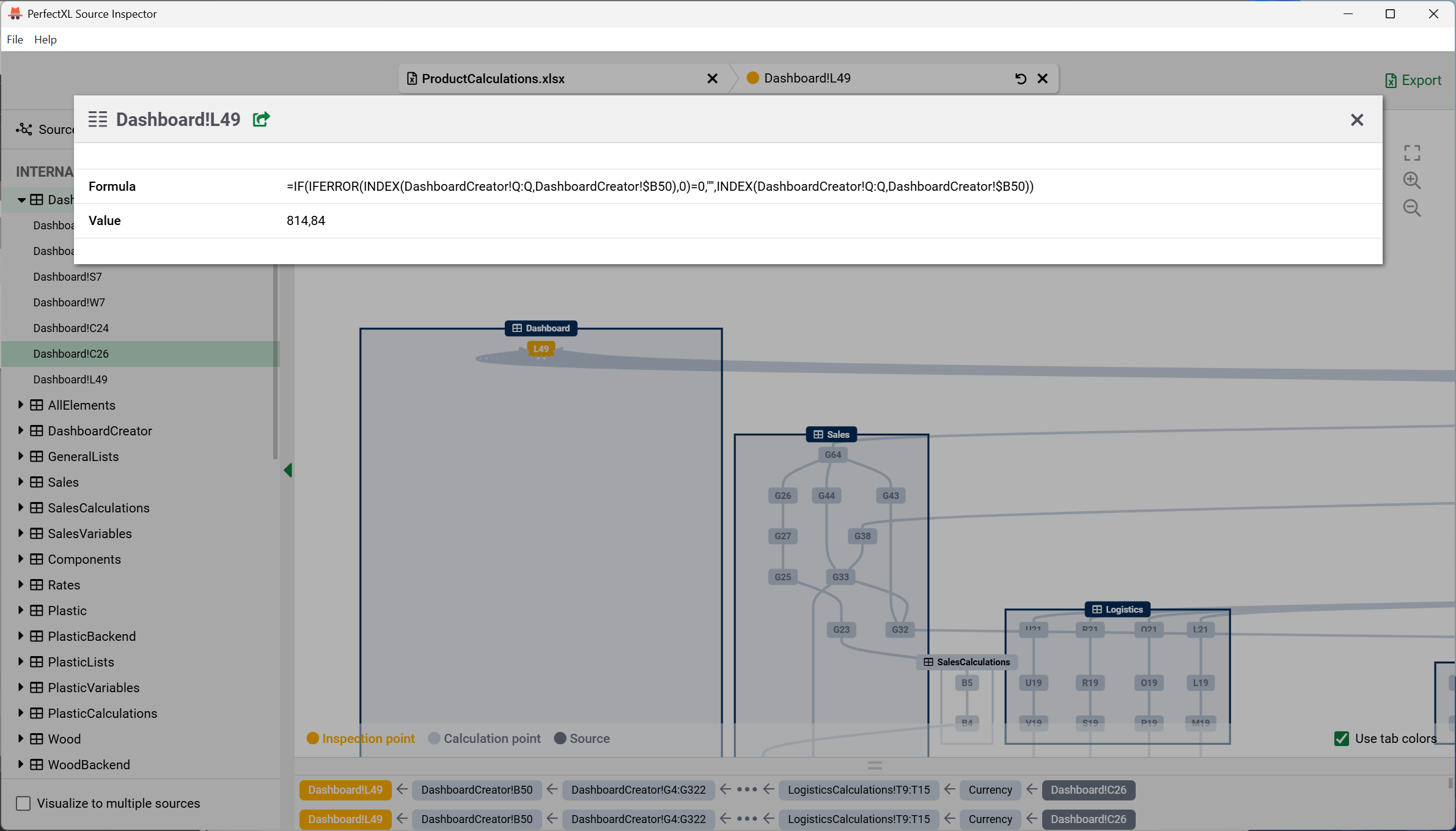
Inspect values directly

Understand relationships
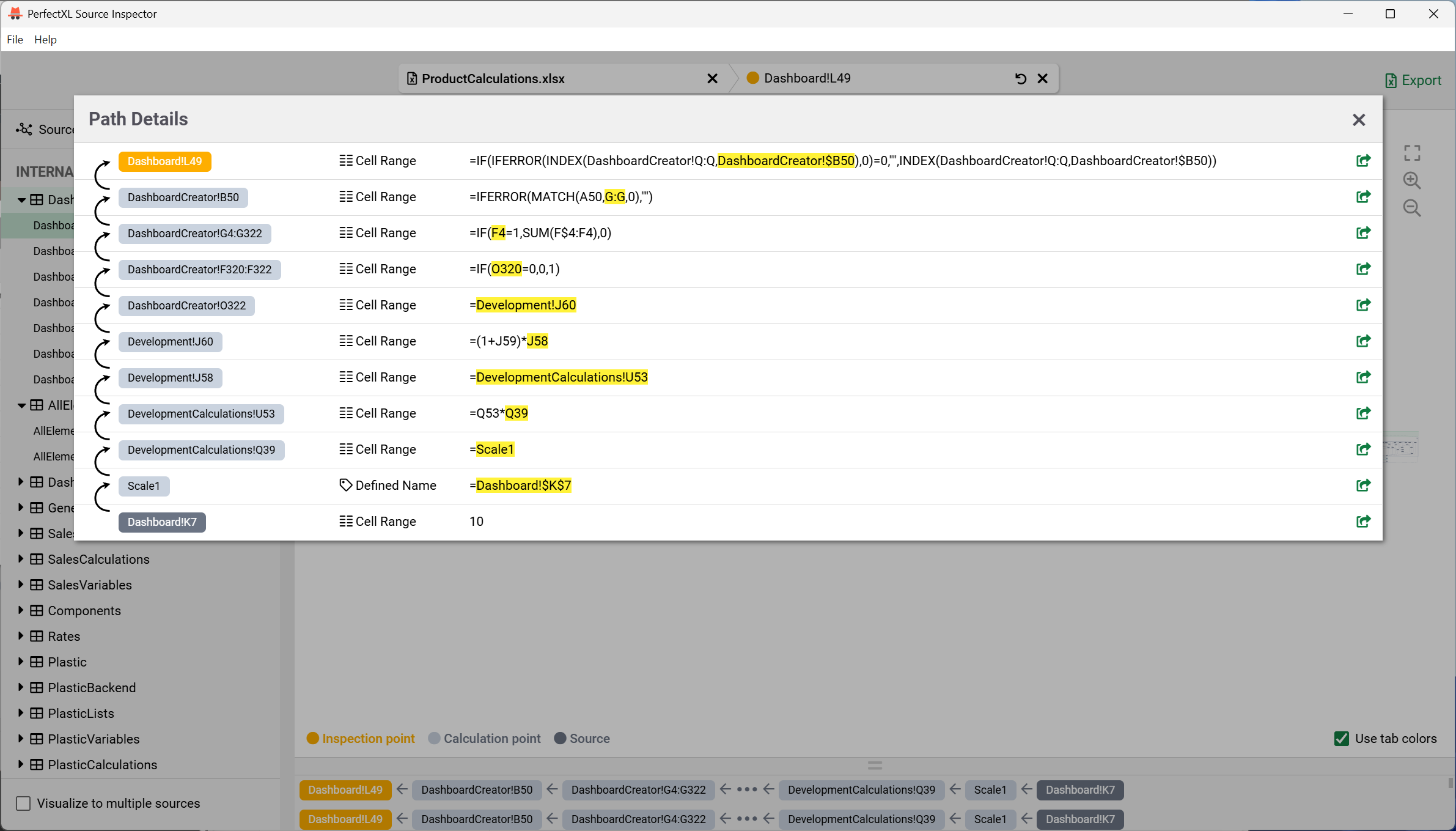
Dive into path details

Compare multiple sources

Export clear documentation
Simple workflow, sophisticated results

Trace
Quickly uncover every data source behind any cell or range, internal or external. See how information flows through your file in one overview.
- Usually ready in <10 seconds
- Supports .xlsx, .xlsm, .xls, etc.
- Step-by-step data path

Verify
Confirm that your workbook pulls the right data from the right places. Detect outdates, missing, or incorrect links before they affect your results.
- Spot broken references
- Check worksheet consistency
- Ensure inputs = expectations

Document
Create clear, shareable insight into your model’s structure. Perfect for audits, reviews, or collaboration across teams.
- Export full reports to Excel
- Record all sources and values
- Showcase dependencies clearly
How to get PerfectXL Source Inspector

1. Get in touch
Request a trial or book a demo to experience what the PerfectXL Source Inspector can do for your organization.

2. Decide
Decide between the PerfectXL Source Inspector or the full PerfectXL Suite. Pricing options are provided on request.

3. Roll-out
From local installations to extensive deployments through your IT department, we’ll ensure an easy roll-out.
Organizations that went before you